How I Turned My Blog Posts into Engaging Videos Using Vidnoz AI
I write a lot: blog posts, how-to guides, and listicles. My content library kept growing, but my reach stayed flat. Then a friend suggested I repurpose my blogs into videos. It sounded like a great idea, but I had zero video editing skills and even less time.
That’s when I discovered Vidnoz AI, and it completely changed how I approach content creation.
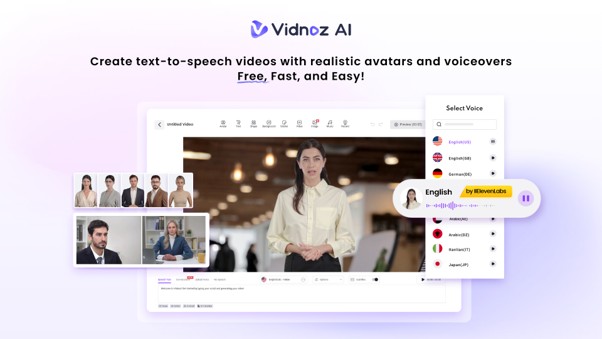
Vidnoz AI is a free AI video maker that simplifies video creation for all. No crew, no editing software, no camera. It’s also certified with ISO/IEC 27001:2022, which is the standard for Information Security Management; that made me feel at ease with using it straight away.
Why I Stopped Letting Blog Posts Gather Dust
There were many blogs I had written that performed quite well on their own, but most of them were barely read because people today prefer watching over reading. Videos tend to get more shares, longer watch time, and better visibility in rankings.
I realized I was not fully leveraging my content. What I needed was a way to quickly turn my written words into something people actually want to watch. Vidnoz AI did exactly that.
The Features That Made It Work for Me
The first thing that surprised me was how much was already built in. I did not need to source voiceovers, hunt for templates, or hire a designer. Everything was there from the start.
1,900+ Lifelike Avatars
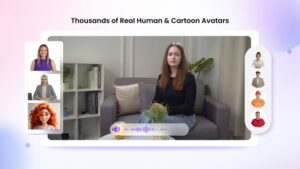
I picked an avatar that matched the tone of my blog niche. More than 1,900 realistic avatars of various professions and industries. A professional-looking digital presenter was used for this techy post. Since I’m a blogger who has a casual approach to her blog, I changed it to a warmer and more approachable one. Customisation can also be taken a step further: a digital body with an expressive avatar, which moves with your face, and/or the creation of a product avatar, which shows products in a visual manner. An avatar for the occasion, every time!
2,000+ Lip Sync AI Voices
My readers are from all over the world. With over 2,000 natural-sounding AI voices in more than 140 languages, powered by ElevenLabs, Microsoft, and Google, I could create versions of the same video for different audiences. The lip sync is tight. The avatar’s mouth movement matches the audio naturally, so nothing feels off or robotic.

2,800+ Pre-Designed Video Templates
I was not starting from scratch every time. Vidnoz AI offers more than 2,800 pre-designed templates built for different content types. I picked one that matched my blog topic, adjusted the layout slightly, and moved on. This alone saved me hours every week.

Free Daily Use
Every user has 30 credits of video generation per day. For short blog summaries or quick social clips, that is more than enough to test things out without spending anything.
How I Actually Make the Videos
Here is the exact process I follow every time I repurpose a blog post.
Step 1: Choose a Template and Avatar
I log in to the Vidnoz AI Video Generator platform, browse the template library, and pick something that fits the blog topic. Then I select an avatar. I usually stick to one or two consistent avatars across my content so my audience starts to recognize the style.
Step 2: Create the AI Voiceover
I take the key points from my blog post and write a short, punchy script. I keep it under 300 words — the goal is a highlight reel, not a full reading. I pick a voice that fits the tone, choose my language, and the AI handles the rest. The sync between voice and avatar is smooth every time.
Step 3: Add a Custom Touch
This is where I make it feel like mine. I drop in my logo, add a background that matches my blog’s color scheme, and include a CTA like “Read the full post — link in bio.” For some videos, I add text overlays to highlight key stats or quotes from the article.
Step 4: Generate and Share
One click and the video is ready in seconds. I download it in HD and post it to Instagram, LinkedIn, or YouTube Shorts, depending on the topic. The whole process takes me under ten minutes per blog post now.
Also Read:
How AI Video Is Turning Product Descriptions Into Scroll-Stopping Content
What I Think After Using It Consistently
Vidnoz AI is not just a novelty. It is a real part of my content workflow now. My video posts consistently get more engagement than the original blogs, and I am reaching people who would never read a 1,000-word article. If your content is sitting unread, turning it into a video might be the simplest fix — and with Vidnoz AI, it is genuinely easy to start.
Also Read:
How AI Image Generators Are Changing the Way Thumbnails Are Created for Video Content